03 · SaaS · E-signature · 5 min read
The electronic document signing experience
An iterative, user-centered approach at Clicksign, a Brazilian e-signature platform, with proposed improvements that have great potential to increase satisfaction and trust in the platform.
- Problem
- The experience for people signing documents was outdated, and the company had little data on how it was used.
- What I did
- I cross-checked support tickets, NPS, Hotjar recordings, usage data and a heuristic analysis to map the journey.
- Result
- A journey map with 9 opportunities: from clearer emails to easier access to signed documents.
Context
In electronic signatures, there are two main actors: the operator, who sends the document, and the signer, who signs it.
The platform’s visual experience for signers was outdated. People perceive old designs as obsolete, which affects trust and satisfaction, even when the product works well.
The project aimed to improve the electronic signing experience, reducing errors and improving usability.
My role
- Desk research
- Conversations with stakeholders
- Qualitative data analysis
- Quantitative data analysis
Data gathering and findings
As-is mapping
The first step was to map the possible experiences a signer can have, considering the different ways of receiving a document to sign and the different ways of proving their identity.
Preliminary usage data
With the as-is map in hand, we ran a preliminary survey of the data to understand which scenarios were most common among signers. Based on this data, we defined the scope of the scenario to be studied.
Previous research
The company had previous research focused on the operator, the person who sends the document. Even though that wasn’t the subject of this study, it was possible to gather accounts of how these operators’ signers interacted with the documents they had to sign. The main finding was about one of the ways to authenticate the signer: the handwritten signature.
Conversations with stakeholders
Through conversations with Product, Business, Technology and Support:
- we mapped how each team sees the best signer experience, to align expectations;
- we gathered the pain points and difficulties that each team sees signers facing today;
- we identified the lack of more structured data on signer behavior in the company’s day-to-day.
Support ticket analysis
There are few tickets about the signer experience, mainly because it is the people who send documents, not the ones who sign them, who usually contact support. This scarcity limits quantitative analysis, so we took a more qualitative approach, exploring how these experiences are perceived. Even so, important themes emerged:
- problems signing with a token;
- problems with other authentication methods;
- difficulty accessing signed documents;
- questions about how to sign documents;
- low usability: questions about how to use specific features of the platform.
NPS comment analysis
Like the tickets, NPS responses show the operators’ perspective on the signer experience, a limited sample that still reveals important difficulties:
- difficulty with the emails throughout the entire signing process;
- people creating an operator account just to access the signed document.
Behavior analysis with Hotjar recordings
With Hotjar, we could see how people behave when facing the difficulties raised by the other methods, and find new problems:
- difficulty with token authentication and with authentication for the handwritten signature;
- difficulty accessing signed documents;
- interface elements that are hard to understand;
- accessibility problems caused by the option to customize button colors;
- facial biometrics instructions that are hard to understand;
- data that has to be filled in again and again when there are many documents to sign.
Assessing the critical points
Quantitative data
Analyzing the database showed which issues were most urgent and revealed new behavior patterns, such as data requested at the time of signing that seems obsolete and makes the signer’s experience worse.
Heuristic analysis
Since interface usage problems came up throughout the research, we ran a heuristic analysis to assess the usability of the signing process in more depth.
Benchmarking
Jakob Nielsen recommends using familiar patterns, because people prefer a site to work the same way as the ones they already know. After identifying the users’ pain points, we analyzed competitors’ experiences to find opportunities and the places where the product diverged from market standards.
Opportunities for improvement
- Reduce the number of emails sent during the signing process.
- Make the emails clearer and more informative.
- Give more visibility to important and support information in the emails.
- Optimize reading documents on mobile.
- Make it easier to create an account and access signed documents.
- Offer recovery for expired links.
- Consider new communication channels, such as WhatsApp.
- Consider richer interface features, such as animation, to show the steps of the more complex authentication methods.
- Consider improvements to authentication by handwritten signature.
What the research delivered
To make it easier to spot critical points and opportunities, I created a signer journey map with the pain points found (organized by method), the heuristics affected at each stage and some quantitative data. The research gave the company input to improve the signer journey:
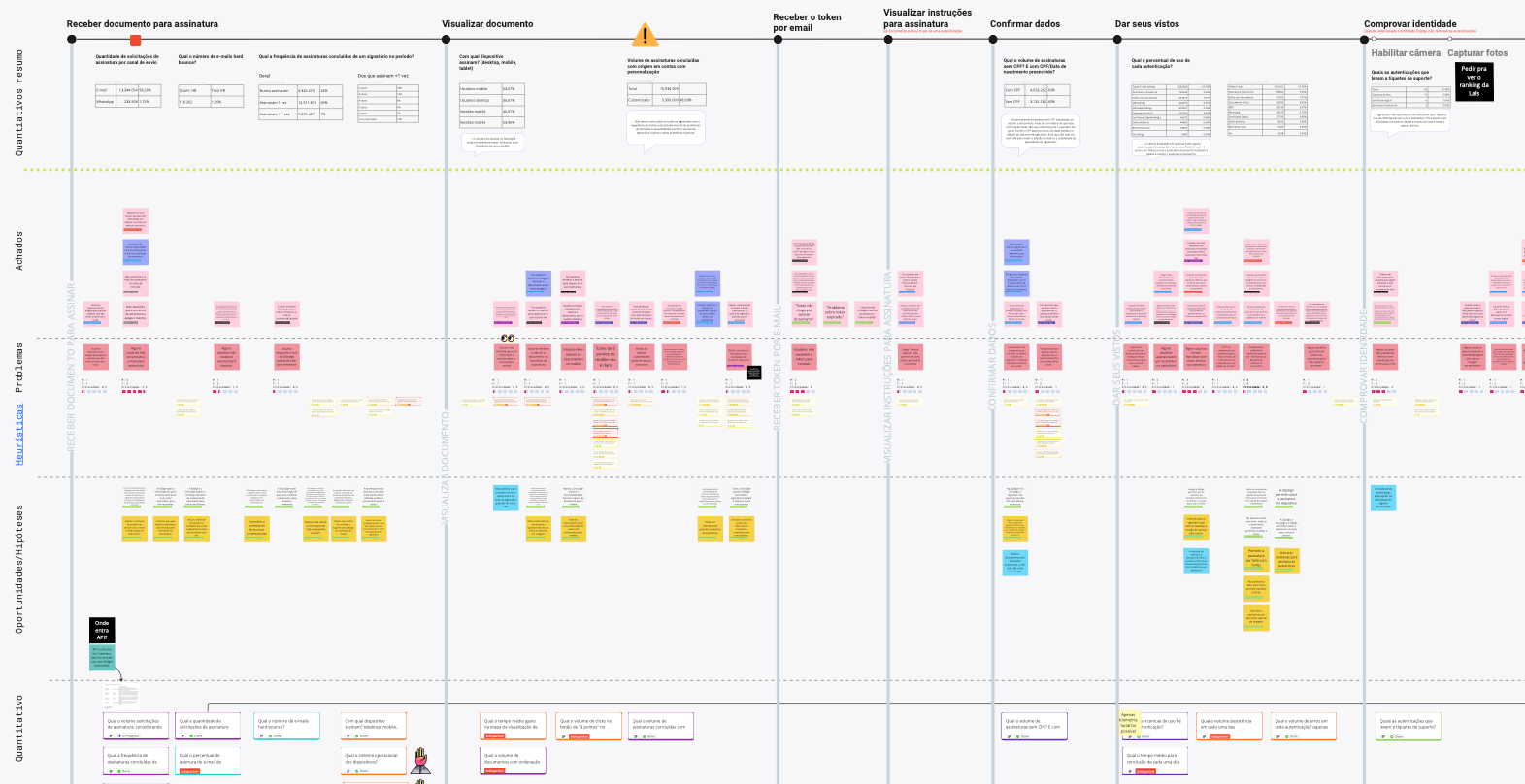
- adjustments to identity verification, to improve the experience and reduce support tickets;
- easier access to signed documents, to reduce accounts created just to see the document and keep the database cleaner;
- adjustments to email communication, so people understand the signing process;
- improvements based on the heuristic analysis, to increase trust and satisfaction.
Next steps
- Implement interface improvements according to the heuristics and the feedback gathered.
- Improve identity verification, email communication and access to documents.
- Run usability tests to validate the changes.
- Collect ongoing feedback to identify new areas for improvement.
- Measure the success of the improvements, such as fewer support tickets and higher satisfaction.